

Data Analysis Tools: A Complete Guide for Research Papers
In today’s world of data, organizations and researchers rely heavily on data analysis tools to transform raw information into actionable insights. Whether working with business intelligence, academic research, or big data environments, selecting the right data analytics tool can significantly improve how analysts and data scientists interpret information.
This comprehensive guide from IvyResearchWriters.com explains the meaning of data analysis tools, explores popular platforms like Excel and Google Data Studio, and discusses how professionals perform data analysis using modern analytics technologies.
What Is Data Analysis? Understanding Data Analytics in Research
Data analysis is the process of examining, cleaning, transforming, and modeling data to discover useful insights, support decision-making, and solve complex problems. Within the field of data analytics, researchers use statistical analysis, predictive analytics, and visualization techniques to analyze data effectively.
A data analysis tool refers to software designed to help users work with data, manipulate datasets, and generate meaningful results from large volumes of data. These tools are widely used in data science, business intelligence, and academic research to perform data exploration and discovery.
Data analysis tools are software applications that enable analysts to:
- Explore data from various sources
- Perform statistical analysis
- Conduct predictive analytics
- Visualize data
- Transform raw data into meaningful information
Because organizations generate enormous amounts of business data, data professionals rely on advanced analytics capabilities to process complex data efficiently.
Data Analytics Tools and the Rise of Data Analytics Platforms
Modern data analytics tools operate within broader analytics platforms that integrate multiple functionalities such as data visualization, data modeling, and data integration.
A data analytics platform typically allows users to:
- Access data stored in databases or a data warehouse
- Combine data from various sources
- Perform advanced analytics
- Generate reports and dashboards
These platforms are essential for businesses working with big data and real-time data streams. Analysts and data engineers use such platforms to analyze data across different departments and systems.
Excel and Microsoft Excel: The Foundation of Data Analysis
One of the most widely used data analysis tools is Microsoft Excel. For decades, Excel has been a fundamental tool in business intelligence and data analysis.
Excel allows analysts to:
- Perform statistical analysis
- Conduct data manipulation
- Clean datasets through data cleaning functions
- Create charts and dashboards
- Work directly with data from various sources
Excel remains popular among analysts because it allows users to explore data and perform manual data analysis without requiring advanced programming skills.
Even though more advanced analytics platforms exist today, Excel continues to serve as a foundational analysis tool for data professionals.
Google Data and Google Data Studio for Visualization
Another powerful data visualization tool is Google Data Studio, which is part of the broader Google data analytics ecosystem.
Google Data Studio allows users to:
- Connect to different data sources
- Create interactive dashboards
- Visualize data across multiple datasets
- Integrate data from Google Analytics and other platforms
Because it operates in the cloud, Google Data Studio enables analysts to explore data without installing complex software applications.
When combined with Google Analytics, this tool provides real-time insights into business performance and customer behavior.
Tableau and Popular Data Visualization Tools
Among the best data analytics tools, Tableau stands out as one of the most widely used data visualization tools in modern analytics.
Tableau is a data visualization platform that helps analysts transform raw data into actionable insights through interactive dashboards and visual reports.
Tableau enables users to:
- Explore data and create visualizations
- Integrate data from various data sources
- Perform advanced analytics
- Analyze large amounts of data quickly
Visualization tools like Tableau make it easier to communicate insights from data to decision-makers.
SQL and Database Analysis Tools
Structured Query Language (SQL) is another essential analysis tool used to analyze data stored in databases.
SQL allows analysts to:
- Retrieve data from databases
- Perform complex queries
- Combine datasets from different data sources
- Process large volumes of data efficiently
Many analytics platforms integrate SQL to support data integration and data exploration processes.
Because businesses store enormous amounts of business data in relational databases, SQL is a critical skill for data scientists and data engineers.
Using Data Analysis Tools in the Field of Data Science
In the field of data science, analysts use multiple tools simultaneously to perform advanced analytics.
Data professionals often combine:
- Excel for quick analysis
- SQL for database queries
- Tableau for visualization
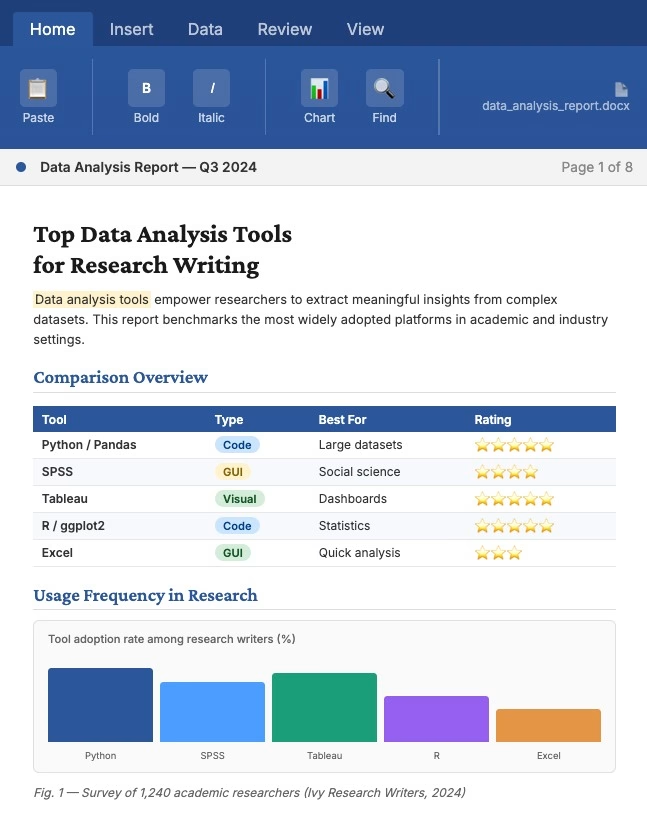
- Python or R for statistical analysis
These tools help analysts transform raw data into meaningful insights that guide business strategies.
Modern data tools enable data scientists to explore data without manually processing datasets, reducing time spent on data cleaning and preparation.
Need Help With Your Data Analytics Assignment or Research Paper?
Writing a strong data analytics case study, research paper, or assignment can be challenging—especially when it involves interpreting large datasets, using analytics tools, and presenting insights clearly.
Data Exploration and Predictive Analytics
One of the most important capabilities of modern analytics platforms is predictive analytics. Predictive analytics uses statistical models and machine learning algorithms to forecast future outcomes.
Predictive analytics helps organizations:
- Identify patterns in complex data
- Predict customer behavior
- Improve marketing strategies
- Optimize supply chain management
Predictive models require access to large datasets and advanced analytics capabilities. Data engineers and analysts use specialized software applications to process wide ranges of data efficiently.
15 Powerful Data Analytics Tools Used by Analysts
Many organizations rely on specialized tools to perform data analysis. Here are 15 powerful data analytics tools commonly used by analysts:
- Microsoft Excel
- Tableau
- Google Data Studio
- Google Analytics
- SQL databases
- Power BI
- Python
- R
- SAS
- Apache Spark
- Hadoop
- QlikView
- Looker
- RapidMiner
- KNIME
These tools help analysts explore data, create visualizations, and generate insights from large datasets.
Choosing the Right Data Analytics Tool
Choosing the right data analytics tool depends on several factors, including:
- The type of data being analyzed
- The volume of data available
- The analytics capabilities required
- Integration with existing systems
- Ease of use for analysts and data professionals
Organizations must evaluate their business needs before selecting an analytics platform.
Choosing the right data analytics solution can significantly improve the efficiency of data analysis processes and enable organizations to extract insights from data more effectively.
Using Data Analysis Tools for Business Intelligence
Modern businesses rely heavily on business intelligence and data analytics to guide strategic decisions.
Data analysis tools help organizations:
- Convert raw data into actionable insights
- Monitor real-time data trends
- Analyze customer behavior
- Improve operational efficiency
- Support data-driven decision-making
Business intelligence platforms allow companies to explore data across departments and generate insights into their data for better strategic planning.
Why Data Analysis Tools Are Essential in Research
For researchers and analysts, using data analysis tools is essential for:
- Performing statistical analysis
- Visualizing research findings
- Integrating data from various sources
- Managing complex datasets
Researchers often work with large amounts of data collected from surveys, experiments, or databases. Without proper analysis tools, interpreting such data would be extremely difficult.
20 Practice Data Analytics Questions with Solutions
1. What is data analytics?
Question:
Define data analytics and explain its importance in modern organizations.
Solution:
Data analytics is the process of examining datasets to discover patterns, trends, and insights that support data for decision-making. Organizations rely on data analytics tools that help analyze large volumes of information and transform raw data into actionable insights.
2. What are the four main types of data analysis?
Question:
Identify the four major types of data analysis.
Solution:
- Descriptive analysis
- Diagnostic analysis
- Predictive analysis
- Prescriptive analysis
These methods help organizations analyze many data points and improve strategic planning.
3. What is descriptive data analysis?
Question:
Explain descriptive data analysis.
Solution:
Descriptive analysis summarizes historical information and identifies trends in like data sets. It answers the question: What happened?
4. What is predictive analytics?
Question:
Describe predictive analytics.
Solution:
Predictive analytics uses historical data, algorithms, and machine learning to forecast future outcomes. Many companies now use AI data analyst systems to perform predictive modeling.
5. What is the role of data visualization?
Question:
Why is data visualization important in analytics?
Solution:
Data visualization helps analysts present complex findings clearly. It allows users to explore data through dashboards and graphs, improving understanding of large datasets.
6. What is business intelligence?
Question:
Explain the concept of business intelligence.
Solution:
Business intelligence refers to technologies and strategies used for analyzing business information. Business intelligence and analytics systems convert many data sources into meaningful reports for decision-makers.
7. What is a data analytics platform?
Question:
Define a data analytics platform.
Solution:
A data analytics platform that provides tools for processing, visualizing, and analyzing data from multiple sources is called a data analytics platform.
8. What is data cleaning?
Question:
Why is data cleaning important?
Solution:
Data cleaning removes errors, duplicates, and incomplete values from datasets. Clean datasets improve accuracy when analysts work with data using statistical techniques.
9. What is big data?
Question:
Define big data.
Solution:
Big data refers to extremely large datasets that require specialized tools and infrastructure for analysis.
10. What is SQL used for in data analytics?
Question:
Explain the role of SQL in analytics.
Solution:
SQL is used to retrieve and manipulate data stored in databases. Analysts use SQL queries to analyze many data records efficiently.
11. What are common data analytics tools?
Question:
Name three widely used analytics tools.
Solution:
Examples include:
- Excel
- Tableau
- Google Data Studio
These data analytics tools that help analysts interpret datasets and generate insights.
12. What is exploratory data analysis (EDA)?
Question:
Define exploratory data analysis.
Solution:
EDA involves examining datasets visually and statistically to discover patterns before formal modeling.
13. What is the role of AI in data analytics?
Question:
How does artificial intelligence improve analytics?
Solution:
AI automates pattern detection and forecasting. An AI data analyst can analyze large datasets faster than traditional methods.
14. What is a data warehouse?
Question:
Define a data warehouse.
Solution:
A data warehouse is a centralized repository that stores data from multiple sources for reporting and analysis.
15. What is real-time data analysis?
Question:
Explain real-time data analysis.
Solution:
Real-time analysis processes information immediately after it is generated. Modern analytics platforms process data across systems instantly.
16. What is data modeling?
Question:
Define data modeling.
Solution:
Data modeling organizes information into structures that make analysis easier. It helps analysts analyze like data relationships within datasets.
17. Why are analytics tools important for businesses?
Question:
Explain the importance of analytics tools in organizations.
Solution:
Analytics tools allow businesses to interpret many data sources and convert them into insights that guide data for decision-making.
18. What skills are needed to become a data analyst?
Question:
List three key skills for data analysts.
Solution:
- Statistical analysis
- Data visualization
- Programming or database knowledge
These skills help analysts process data using modern analytics tools.
19. What is a dashboard in analytics?
Question:
Explain what a dashboard is.
Solution:
A dashboard is a visual interface that displays metrics, charts, and reports in one place so users can explore data easily.
20. How do data analytics tools support decision-making?
Question:
Explain how analytics tools assist organizations.
Solution:
Modern analytics platforms that allow users to analyze data quickly help organizations convert complex datasets into insights for strategic planning. These tools are increasingly essential for effective data for decision-making.
Data Analytics Case Study Assignment
Title: Using Data Analytics to Improve Business Decision-Making
1. Introduction
In the modern world of data, organizations rely on data analytics to transform raw information into valuable insights. Businesses generate large amounts of business data daily from sales transactions, online interactions, and customer feedback. However, without effective data analysis tools, this information cannot be transformed into actionable strategies.
This data analytics case study assignment explores how companies can use data analytics tools that help analysts interpret information, visualize patterns, and improve data for decision-making. By analyzing datasets and identifying trends, analysts can convert raw data into actionable insights that support business growth and strategic planning.
2. Case Study Background
A retail company operating both physical stores and an online marketplace noticed a decline in revenue despite an increase in website traffic. Management suspected that customers were browsing products but not completing purchases.
To understand this issue, the company decided to use data analytics tools to analyze data across multiple sources, including:
- Website analytics data
- Customer purchase history
- Marketing campaign performance
- Customer feedback data
Using these various data sources, analysts aimed to explore data patterns and identify factors affecting sales performance.
3. Problem Statement
The organization faces the following challenges:
- Website visitors are increasing, but conversions remain low.
- Marketing campaigns are generating traffic but not improving sales.
- Management lacks insights from many data sources.
The company needs to use data analytics platforms that allow users to analyze customer behavior and identify strategies to improve conversion rates.
4. Objectives of the Analysis
The main objectives of this case study are to:
- Analyze customer behavior using data analytics tools that help interpret data
- Identify trends in customer purchasing behavior
- Transform raw data into meaningful insights
- Provide recommendations for improving business performance
- Support data for decision-making within the organization
5. Data Sources
The organization collects information from different sources. Analysts work with data using various datasets, including:
- Website analytics data – information about visitor behavior
- Sales transaction data – records of customer purchases
- Customer demographic data – information about age, location, and preferences
- Marketing campaign data – email and social media marketing performance
These data from various sources allow analysts to identify patterns in customer behavior.
6. Data Analysis Methods
Analysts applied several techniques within the field of data analytics to analyze the company’s performance.
Descriptive Analysis
Descriptive analysis was used to summarize historical data and identify patterns. Analysts examined like data sets to understand:
- Monthly sales trends
- Website visitor behavior
- Product popularity
This analysis revealed that website traffic had increased by 30%, but the purchase conversion rate had declined.
Diagnostic Analysis
Diagnostic analysis examined why sales were declining. Analysts compared many data variables such as:
- Time spent on product pages
- Cart abandonment rates
- Pricing comparisons
The analysis showed that customers were abandoning shopping carts due to high shipping costs.
Predictive Analysis
Predictive models were used to forecast future sales trends. Using statistical techniques and machine learning tools, analysts estimated that reducing shipping costs could increase conversions by 20%.
Some organizations also rely on AI data analyst tools to automate predictive modeling.
Prescriptive Analysis
Prescriptive analysis provided recommendations for improving business performance. Analysts suggested strategies such as:
- Offering free shipping for orders above a certain amount
- Simplifying the checkout process
- Personalizing product recommendations
These recommendations were based on insights generated from business intelligence and analytics systems.
7. Tools Used for Data Analysis
Several data analytics tools were used during this analysis.
Microsoft Excel
Excel helped analysts organize and analyze many data records. Excel functions were used to calculate averages, identify trends, and perform basic statistical analysis.
SQL
SQL allowed analysts to retrieve data stored in databases and analyze customer purchase patterns.
Tableau
Tableau, a data visualization tool, was used to create dashboards that allowed managers to explore data visually.
Visualization dashboards enabled users to explore data more easily and understand key insights.
Google Analytics
Google Analytics helped analyze website behavior and identify the pages where customers abandoned their shopping carts.
8. Key Findings
The analysis produced several important insights.
- Customers frequently abandoned carts when shipping costs were revealed at checkout.
- Mobile users had a higher abandonment rate than desktop users.
- Returning customers were more likely to complete purchases.
These insights were derived by analyzing many data sets across different systems.
9. Recommendations
Based on the findings, analysts recommended the following strategies:
Reduce Shipping Costs
Offering free shipping for orders above a certain threshold could increase sales.
Improve Checkout Process
Simplifying the checkout process would reduce cart abandonment.
Use Personalized Marketing
Targeted marketing campaigns could increase engagement with returning customers.
These strategies use data for decision-making to improve business performance.
10. Conclusion
This case study demonstrates how data analytics tools enable organizations to transform large datasets into meaningful insights. By analyzing customer behavior and identifying patterns, businesses can improve strategies and enhance customer experiences.
Modern analytics platforms that allow users to analyze information quickly make it possible to explore many data sources efficiently. As a result, organizations can rely on data analytics tools that help convert complex datasets into actionable insights that support long-term success.
Assignment Questions for Students
- What problem was the company facing in this case study?
- What data sources were used in the analysis?
- Which type of data analysis identified the cause of low sales?
- What tools were used to analyze the data?
- What recommendations were proposed to improve business performance?
- How did data analytics support business decision-making in this case?
Conclusion: The Growing Importance of Data Analytics Tools
As organizations continue to generate increasing volumes of data, the demand for sophisticated data analytics tools continues to grow. From Excel and SQL to advanced analytics platforms like Tableau and Google Data Studio, these tools enable analysts to transform raw data into meaningful insights.
In the modern world of data, choosing the right data analytics tool is critical for businesses, researchers, and data professionals who want to unlock the full value of their information.
At IvyResearchWriters.com, we help students develop research papers on topics such as:
- Data analytics tools
- Data science methodologies
- Business intelligence systems
- Predictive analytics
- Big data technologies
Our expert writers ensure your research papers include accurate analysis, clear explanations, and well-structured academic content.
Frequently Asked Questions
What are the 5 types of data analysis?
In research and professional analytics, scholars commonly identify five major types of data analysis used to transform information into insights. These approaches help analysts interpret many data points and convert them into knowledge that supports data for decision-making.
The five major types include:
- Descriptive Analysis
Explains what happened in a dataset by summarizing historical information. Analysts work with data using visualization and statistical tools to identify patterns. - Diagnostic Analysis
Investigates why something happened. Analysts compare different variables and like data sets to determine causes behind trends. - Predictive Analysis
Uses models and algorithms to forecast future outcomes. Modern organizations increasingly rely on AI data analyst systems and machine learning tools to make predictions. - Prescriptive Analysis
Recommends actions based on predictive results. This approach is common in business intelligence and analytics environments where organizations want actionable strategies. - Exploratory Data Analysis (EDA)
Allows analysts and researchers to examine many data sources without predefined assumptions. This stage often involves tools that enable users to explore data visually.
At IvyResearchWriters.com, we help students explain these analytical frameworks clearly in research papers and demonstrate how each approach contributes to modern data science.
What are the top 3 skills for a data analyst?
A successful data analyst needs a combination of technical and analytical abilities. As organizations increasingly rely on data analytics tools that help interpret large datasets, certain skills have become especially important.
The top three skills include:
- Data Analysis and Interpretation
Analysts must know how to analyze datasets, identify patterns, and interpret insights from many data sources. This skill ensures that data is translated into meaningful information for organizations. - Technical Skills and Data Tools
Analysts must understand tools and platforms used in modern analytics environments. Many companies rely on an analytics platform that allows users to access and visualize datasets efficiently. - Data Visualization and Communication
It is not enough to analyze information—analysts must communicate insights clearly. Visualization dashboards help stakeholders understand data for decision-making quickly.
Modern analytics tools are evolving rapidly, and tools are increasingly integrating artificial intelligence features to support data scientists and analysts.
What are the 4 types of data analysis?
Many academic frameworks simplify the analytical process into four major types of data analysis. These categories form the foundation of modern business intelligence and analytics systems.
The four types include:
- Descriptive Analysis – Explains what happened in past data.
- Diagnostic Analysis – Determines why a trend occurred.
- Predictive Analysis – Uses statistical models to forecast outcomes.
- Prescriptive Analysis – Suggests strategies and recommended actions.
Organizations rely on these methods because they transform data using advanced analytics techniques into insights that guide strategy.
Modern platforms, such as a data analytics platform that provides visualization and modeling capabilities, allow analysts to perform all four types of analysis within a single system.
Is Excel a data analysis tool?
Yes, Excel is widely considered a data analysis tool, and it remains one of the most commonly used platforms for working with datasets.
Excel allows analysts to:
- Work with many data records efficiently
- Perform statistical calculations
- Create charts and dashboards
- Conduct data cleaning and transformation
- Organize datasets for data for decision-making
Although modern analytics tools and data analytics platforms that provide advanced features have emerged, Excel remains essential because it allows users to explore data easily without specialized programming knowledge.
Today, many data analytics tools that help analysts perform complex analysis still integrate Excel as part of broader business intelligence and analytics workflows.
At IvyResearchWriters.com, we assist students in understanding how tools like Excel, SQL, and modern analytics platforms work together in academic research and real-world data analysis projects.

