

Mastering the APA Header: A Comprehensive Guide for Academic Writers

When it comes to academic writing, formatting is crucial. Whether you’re working on a research paper, thesis, or dissertation, following a specific formatting style not only gives your work a professional appearance but also ensures consistency and clarity. The APA style (American Psychological Association) is one of the most commonly used formats in academic writing, particularly in the social sciences. A key element of this style is the APA header, which serves to organize and clearly present essential information in the document.
In this blog post, we will delve into the specifics of the APA header: its purpose, how to format it correctly, and common mistakes to avoid. By the end, you’ll be equipped with the knowledge to properly implement the APA header in your academic papers.
What is the APA Header?
The APA header is the section at the top of each page in your academic paper that includes specific details, such as the page number and, in some cases, the title of the paper. This formatting style ensures that the document is properly organized and that it meets the expectations of academic institutions and publishers. It’s a vital part of APA 7th edition, which is the most recent update to the APA manual.
Key Elements of an APA Header
The main components of an APA header are:
- Page Number
A page number is required on every page of your paper, located in the top right corner. The page numbering starts from the first page of the document, which is typically the title page. - Running Head (For Student Papers)
The running head is a shortened version of your paper’s title that appears in the header, aligned to the left margin. This element is included in the header only for professional papers. For student papers, as per the 7th edition of APA, the running head is no longer required unless specifically requested by the instructor or publisher. - Title of the Paper (For Professional Papers)
In professional papers (e.g., dissertations, theses, or research articles), the full title of the paper is also placed in the header along with the running head. However, for student papers, the title is not included in the header but appears in the title page. - Spacing and Font
The header should be written in Times New Roman, 12-point font, and the page number should be placed in the top right corner. The text in the header should be aligned properly according to the APA guidelines.
Step-by-Step Guide to Formatting the APA Header
1. Setting Up the Page Number
In an APA style document, the page number must appear on every page. To ensure consistency:
- Insert the page number in the top right corner of each page.
- Start numbering at 1 on the title page, regardless of whether it’s the first page of your document.
In Microsoft Word or Google Docs, this can be easily done by selecting the “Insert” option and choosing “Page Number.” The page number should be flush right and appear in the header of your document.
2. Creating the Running Head (For Professional Papers)
For professional papers, the running head is a shortened version of the full title. Here’s how to format it:
- On the title page, the header includes the words “Running head:” followed by a short version of your paper’s title, all in capital letters. This appears in the top left corner of the title page.
- On subsequent pages, the running head should be shortened to just the short version of your title in all caps, without the phrase “Running head:”.
For example, if your full title is “Exploring the Role of Technology in Education: A Study of Online Learning,” your running head on the title page would look like this:
- Running head: TECHNOLOGY IN EDUCATION
On the following pages, the running head would simply appear as:
- TECHNOLOGY IN EDUCATION
3. Adding the Title of the Paper (For Professional Papers)
In addition to the running head, professional papers require the full title of the paper in the header. Here’s how it works:
- Title on the title page: The full title of your paper is aligned to the left margin in the header, and it is followed by the page number on the right.
- Title on subsequent pages: Only the page number appears on the subsequent pages for student papers, but for professional papers, the title continues to appear in the header on every page.
The title should be no longer than 50 characters (including spaces). For longer titles, use a shortened version of the title in the header to fit within this character limit.
4. Formatting the Header for Student Papers
For student papers, the 7th edition of APA has simplified the header. Now, the header consists only of the page number. The running head and title are not required unless specified by the instructor. Here’s what you need to do:
- For the title page: Only the page number is required, placed in the top right corner.
- On subsequent pages: The page number continues in the top right corner.
Example of an APA Header for a Student Paper
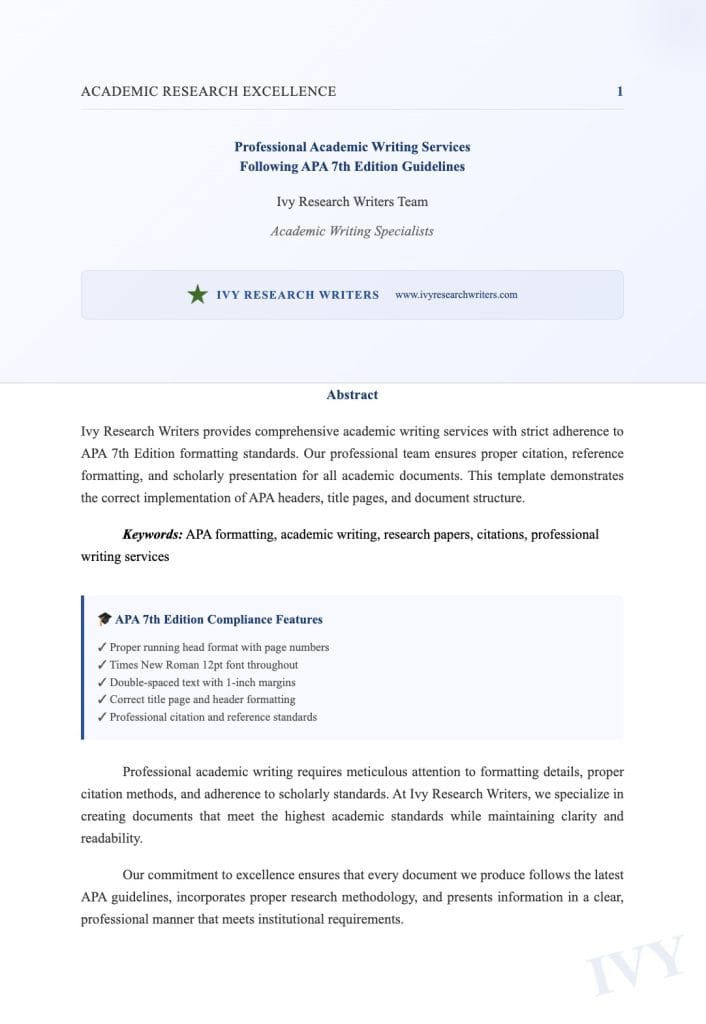
Here’s what the header will look like for astudent paper:
- Page 1 (Title Page): Only the page number in the top right corner.
- Page 2 (and beyond): Only the page number in the top right corner.
Example for a Professional Paper
For a professional paper, such as a thesis or dissertation, the APA header will look like this:
- Page 1 (Title Page):
Running head: TECHNOLOGY IN EDUCATION
Page number: 1 (top right corner) - Page 2 (and beyond):
TECHNOLOGY IN EDUCATION
Page number: 2 (top right corner)
Common Mistakes to Avoid with the APA Header
- Omitting the Page Number
Forgetting to include the page number is a common mistake. Ensure that the page number appears on every page of your document in the top right corner. - Incorrect Running Head Formatting
Some students forget to include the phrase “Running head:” on the title page or don’t format the running head in all caps. Remember, the title page should contain “Running head:” followed by a short version of the title in all caps, while subsequent pages only show the shortened title in all caps without the phrase “Running head.” - Overcomplicating the Title
In professional papers, make sure your running head and paper title in the header are concise and meet the 50-character limit for the title. This ensures clarity and consistency throughout your document. - Inconsistent Font or Spacing
The font for the header should always be Times New Roman, 12-point. Ensure that all text in the header is consistently formatted and properly aligned. - Not Following Guidelines for Student Papers
Many students still use the outdated formatting for student papers, including the unnecessary running head. Always check the specific requirements of your institution or professor to avoid unnecessary formatting errors.
How to Cite the Purdue OWL in APA
Citing resources is an essential part of academic writing, and the Purdue Online Writing Lab (OWL) is one of the most popular online resources for APA guidelines. When citing the Purdue OWL in APA format, you need to follow the same rules as you would for any other online resource. Here’s how you can cite it in APA:
- APA 7th Edition Format: Author(s). (Year). Title of webpage. Website name. URL For the Purdue OWL, the citation would look like this: Purdue Online Writing Lab. (n.d.). APA style and grammar guidelines. Purdue University. https://owl.purdue.edu/owl/purdue_owl.html In this case, there is no specific author mentioned, so you can use the name of the organization. The publication year is marked as “n.d.” because no specific publication date is provided on the site.
Major Paper Sections
In an APA paper, specific sections are required or recommended to help structure the content clearly and logically. These sections include:
- Title Page: The title page contains the title of the paper, the author’s name, and the institution. The header and page number are placed here as well.
- Abstract: An abstract is a brief (150-250 words) summary of the paper’s content. It appears after the title page, on its own page.
- Main Body: The main body is the core of the paper where you present the research, arguments, or analysis. It is divided into sections and subsections using APA heading levels.
- References: At the end of the paper, a References section lists all the sources cited in the document in proper APA format.
These sections help organize the paper for clarity and ensure it adheres to academic standards.
Running heads in Google Docs
Google Docs provides a convenient platform to format your papers in APA style. To insert running heads in Google Docs:
- Click on “Insert” in the top menu bar.
- Select “Header & page number” and then choose “Header.”
- Type your running head on the left side of the header. For professional papers, type “Running head:” followed by a shortened version of your paper’s title in all caps. For student papers, simply type the title in all caps without “Running head:”.
- Insert the page number: To add page numbers, go back to the “Insert” menu, select “Page number,” and choose the format where the number appears on the top right.
Ensure that the running head appears consistently on every page throughout the paper, following APA guidelines.
From the APA Style blog
TheAPA Style Blog is a valuable resource for understanding the latest updates to the APA style guide, including detailed explanations on formatting, citations, and even specific queries related to research writing. The blog addresses common questions that students, researchers, and academics may have regarding APA style, offering examples and tips for proper formatting.
For instance, the blog provides updates on how to format the title page, when to use the running head, and how to structure sections like the introduction or references. It is an excellent tool to clarify any doubts and keep up-to-date with the nuances of APA formatting.
Page numbers
In APA format, page numbers should be placed in the top right corner of each page, including the title page. This ensures that each page is clearly numbered for easy navigation and reference.
- Title Page: Start numbering from the title page, with the page number listed as 1.
- Subsequent Pages: Continue numbering sequentially throughout the rest of the paper, ensuring the page number appears consistently in the top right corner.
In most word processing software, such as Microsoft Word or Google Docs, you can automatically insert page numbers by navigating to the “Insert” menu, selecting “Page Number,” and then choosing the preferred format.
Title page
The title page is the first page of an APA paper and includes essential information about the paper, including the paper’s title, the author’s name, and the institution they belong to. The title page format is as follows:
- Title of the Paper: Centered and placed halfway down the page, the title should be concise and informative. It should clearly convey the topic of the paper.
- Author’s Name: The author’s name appears below the title, also centered. Include the first name, middle initial (if applicable), and last name.
- Institution: The name of the academic institution is listed below the author’s name, also centered.
- Running Head: The running head (if required) appears in the top left corner, and the page number in the top right corner.
Example:
Title of Paper
Author’s Name
Institution Name
Levels of heading
APA style includes five levels of headings that help organize the content of your paper into clear, logical sections. Each level has a distinct format to distinguish it from others:
- Level 1: Centered, bold, title case (e.g., Methods). This is used for main sections such as the introduction, methods, results, and discussion.
- Level 2: Left-aligned, bold, title case (e.g., Participants). This is used for subsections within Level 1 sections.
- Level 3: Left-aligned, bold italicized, title case (e.g., Data Collection). Used for more specific subsections under Level 2.
- Level 4: Indented, bold, title case, ending with a period (e.g., Data Analysis.). This level is used for very specific details within a subsection.
- Level 5: Indented, bold italicized, title case, ending with a period (e.g., Statistical Techniques Used.). This is the most detailed level, used for specifics within Level 4 sections.
Headings help break down complex sections, allowing readers to easily navigate through the paper and understand the structure of your research.
How to do a header for APA format?
The header in APA format contains two essential elements: the running head (for professional papers) and the page number. Here’s how to create a header:
- Page Number: In the header, insert the page number in the top right corner of every page.
- Running Head (for professional papers): On the title page, include the phrase “Running head:” followed by a shortened version of your paper’s title in all caps. On subsequent pages, just include the shortened title in all caps without “Running head.”
For student papers, only the page number is necessary in the header.
To ensure consistency, both elements must appear on every page of your paper, formatted according to APA guidelines. Whether you’re usingMicrosoft Word, Google Docs, or another word processor, these steps can be easily followed to maintain correct header formatting throughout your document.
Is APA 1.5 or 2.0 line spacing?
In APA formatting, the standard line spacing is 2.0, which promotes readability and clarity. Authors should use headings depending on the structure of their work, as this helps to organize the text to help authors organize their ideas effectively. Proper heading usage enhances the overall presentation of the document.
How to do APA 7 header in Word?
APA style uses a unique headings system to help authors organize their text. In the 7th ed edition of the APA publication, you can find guidelines on how to create headers in Word, including the first level of subsection and the number of levels required.
To format your header, place it at the top of the page and refer to the owl site for detailed instructions. The owl pages will guide you on how to italicize and separate and classify paper sections effectively, as covered in the seventh edition.
Moreover, APA also allows for seriation, which can help in organizing your headings depending on the structure of your paper. For additional support, consult the style manuals in the publication manual to ensure compliance with all formatting standards.
How to do APA header in Google Docs?
To create an APA format abstract in Google Docs, start with a new page and ensure your paper should start with a bold and centered title. Follow the 7th edition of the APA guidelines, utilizing APA headings examples to organize your content. Use level 2 headings for subsections, adhering to the APA subheadings format.
The APA style format employs a unique headings system to separate and classify sections. According to the seventh edition APA style manuals, heading ending with a period is acceptable. Incorporate seriation in the body text to enhance clarity and help authors organize and present their work effectively.
In your document, use title case for headings and keep the body text to help authors convey their ideas. Remember, the Purdue OWL® site offers comprehensive resources, including citation APA guidance and examples of 5 heading levels for proper formatting. This structure assists in maintaining a clear level of subordination across your document.
Final Thoughts on the APA Header

Properly formatting your APA header is essential for presenting your academic work in a professional and polished manner. Whether you’re writing a student paper or a professional research article, adhering to APA guidelines will make your document look more credible and polished. Always remember to check the specific requirements for your institution or publication, as there may be slight variations in how the header is formatted. At IvyResearchWriters.com, we offer expert writing services that ensure your academic papers are formatted correctly according to the latest APA guidelines.
Ready to take your academic writing to the next level? Whether you need help with formatting or developing your research paper, our team is here to assist you. Contact us today for professional writing and editing services!
FAQs about APA Headers & Headings: Use Headings in APA Format
What is the purpose of APA headers in academic writing?
The purpose of APA headers is to provide a clear structure to your paper, guiding readers through the sections of the paper. In APA style, headers help to categorize and organize content, making it easier for the audience to understand the flow of information. They are particularly important in longer documents or academic papers, such as student papers and professional papers, where clarity and organization are crucial.
How do I format APA headings correctly?
To format APA headings correctly, you must follow the guidelines set forth in the APA Publication Manual, specifically in the 7th edition. APA headings consist of five levels, each with distinct formatting rules. For example, a level 1 heading is centered and boldface, while a level 2 heading is flush left and boldface. It is essential to use these headings consistently throughout your document to maintain organization.
What is the structure of a page header in APA format?
The page header in APA format includes the running head and the page number. On the title page of a professional paper, the running head appears as “Running head: [TITLE OF YOUR PAPER]” in the header, while subsequent pages only display the paper title in uppercase letters alongside the page number. For student papers, the running head is generally omitted, but the page number should still be included on every page.
What is the difference between APA 6 and APA 7 regarding headings?
The primary difference between APA 6 and APA 7 concerning headings lies in the formatting and usage of the running head. In APA 6, a running head was required for all papers, while in APA 7, it is only mandatory for professional papers.

